> ## Documentation Index
> Fetch the complete documentation index at: https://magicpatterns.mintlify.site/docs/llms.txt
> Use this file to discover all available pages before exploring further.
# Import from Website
> Get inspiration from any website, then edit with AI
## Import via URL (Recommended)
With [Agent Mode](/documentation/feature-releases/changelog#2025-12-03), you can now import any website by simply sharing its URL in your prompt. The agent browses the page, captures its design, and uses it as context.
**How it works:**
1. Start a new design or open an existing project
2. In the prompt, include a URL like: `Clone airbnb.com` or `Make a landing page like stripe.com`
3. The agent automatically browses the website and uses it as design inspiration
This is the fastest way to get design inspiration from any public website.
***
## Chrome Extension
For more advanced use cases, our [Chrome Extension](https://www.magicpatterns.com/extension) lets you import any website into Magic Patterns — including **localhost** and **authenticated pages** that the agent can't browse directly.
### When to use the Chrome Extension
* **Localhost** — Import designs from your local development server
* **Authenticated pages** — Import pages behind a login
* **Individual components** — Select and import specific parts of a page, not just the whole thing
* **Storybook** — Import your Storybook components directly
### Import from Storybook
Storybook is simply a website, so you can use our Chrome Extension to import your Storybook components into Magic Patterns! Simply go to your Storybook and select the preview of the component you want to import. [Install it now](https://www.magicpatterns.com/extension).
## Chrome Extension Examples
Here's some real examples if you're curious what the final output looks like:
* [Components from Storybook](https://www.magicpatterns.com/imported/50957edf-db98-4931-b860-b1a918b6a33e)
* [Hacker News](https://www.magicpatterns.com/imported/82c60aab-2c36-4ce7-8ad5-b4698d5959e8)
* [Claude Welcome Screen](https://www.magicpatterns.com/imported/aebeaf31-bf7a-477e-bc47-9f79bea61a61)
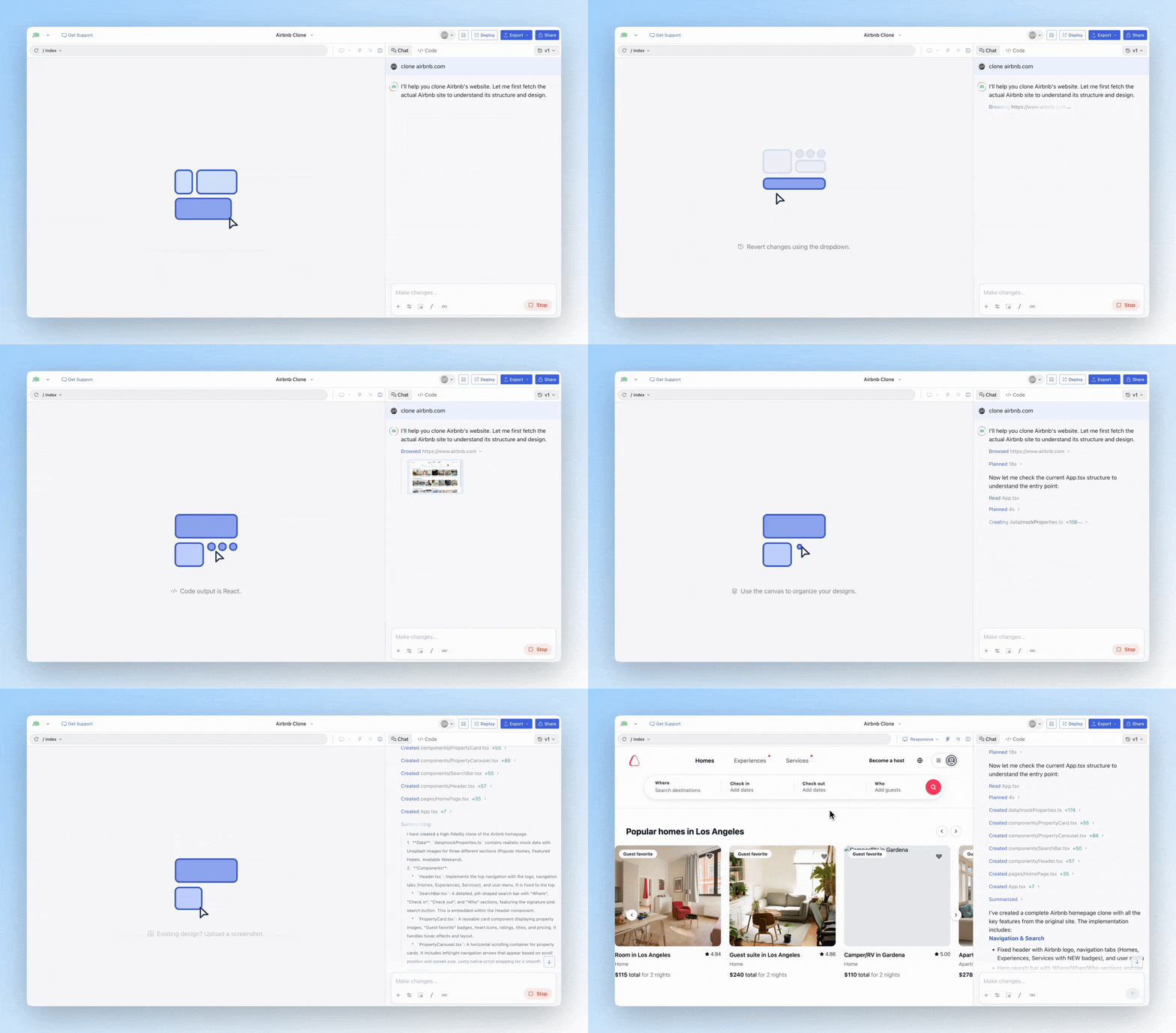 This is the fastest way to get design inspiration from any public website.
***
## Chrome Extension
For more advanced use cases, our [Chrome Extension](https://www.magicpatterns.com/extension) lets you import any website into Magic Patterns — including **localhost** and **authenticated pages** that the agent can't browse directly.
### When to use the Chrome Extension
* **Localhost** — Import designs from your local development server
* **Authenticated pages** — Import pages behind a login
* **Individual components** — Select and import specific parts of a page, not just the whole thing
* **Storybook** — Import your Storybook components directly
### Import from Storybook
Storybook is simply a website, so you can use our Chrome Extension to import your Storybook components into Magic Patterns! Simply go to your Storybook and select the preview of the component you want to import. [Install it now](https://www.magicpatterns.com/extension).
## Chrome Extension Examples
Here's some real examples if you're curious what the final output looks like:
* [Components from Storybook](https://www.magicpatterns.com/imported/50957edf-db98-4931-b860-b1a918b6a33e)
* [Hacker News](https://www.magicpatterns.com/imported/82c60aab-2c36-4ce7-8ad5-b4698d5959e8)
* [Claude Welcome Screen](https://www.magicpatterns.com/imported/aebeaf31-bf7a-477e-bc47-9f79bea61a61)
This is the fastest way to get design inspiration from any public website.
***
## Chrome Extension
For more advanced use cases, our [Chrome Extension](https://www.magicpatterns.com/extension) lets you import any website into Magic Patterns — including **localhost** and **authenticated pages** that the agent can't browse directly.
### When to use the Chrome Extension
* **Localhost** — Import designs from your local development server
* **Authenticated pages** — Import pages behind a login
* **Individual components** — Select and import specific parts of a page, not just the whole thing
* **Storybook** — Import your Storybook components directly
### Import from Storybook
Storybook is simply a website, so you can use our Chrome Extension to import your Storybook components into Magic Patterns! Simply go to your Storybook and select the preview of the component you want to import. [Install it now](https://www.magicpatterns.com/extension).
## Chrome Extension Examples
Here's some real examples if you're curious what the final output looks like:
* [Components from Storybook](https://www.magicpatterns.com/imported/50957edf-db98-4931-b860-b1a918b6a33e)
* [Hacker News](https://www.magicpatterns.com/imported/82c60aab-2c36-4ce7-8ad5-b4698d5959e8)
* [Claude Welcome Screen](https://www.magicpatterns.com/imported/aebeaf31-bf7a-477e-bc47-9f79bea61a61)